draw.Drawing
Methods
Method Reference: draw.Drawing.merge
draw.Drawing: D = merge (D, D2, …)
Append the entities of one or more drawings to this one.
D = merge (D1, D2) returns a drawing holding
every entity of D1 followed by every entity of D2, each
keeping the layer, line type and colour it was drawn with. Any number of
drawings may be given.
The layers of every drawing come with it. A layer several drawings have keeps the properties of the first that has it, as a CAD program keeps its own layers when another drawing is brought in, so a sheet built on a title block draws its parts in the sheet’s layers.
The blocks every drawing defines come with it, so an insert still finds its block. A block defined in several drawings must be defined the same in each, with the same entities and the same blocks inside it: a block is geometry, and one definition silently drawn in place of another would draw the wrong part, so a different definition under the same name is an error naming the block.
The result takes its name and its current layer, line type and colour from the first drawing. Those are the state a caller would carry on drawing with, and the first drawing is the one being added to.
Merging is what turns separately-built parts into an assembly, or
separately-built views into a sheet. With transform it is the
whole of composition: build once, place as often as needed.
See also: draw.Drawing.transform, draw.Drawing.numentities, draw.Drawing.layers
Source Code: draw.Drawing
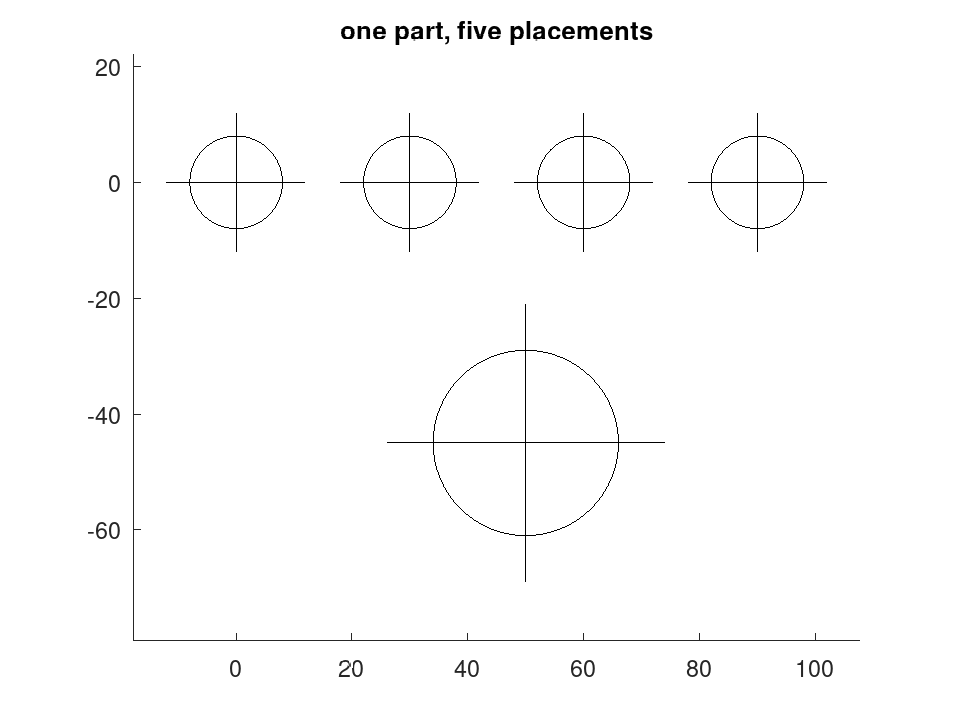
transform and merge together are composition: build a part once and place it as often as needed.
 part = draw.Drawing ().circle ([0, 0], 8).line ([-12, 0], [12, 0]) ...
                       .line ([0, -12], [0, 12]);
 sheet = draw.Drawing ('assembly');
 for k = 0:3
   sheet = sheet.merge (part.transform ('translate', [30 * k, 0]));
 endfor
 big = part.transform ('scale', 2);
 sheet = sheet.merge (big.transform ('translate', [50, -45]));
 numentities (sheet)
ans = 15
 plot (sheet);
 title ('one part, five placements');