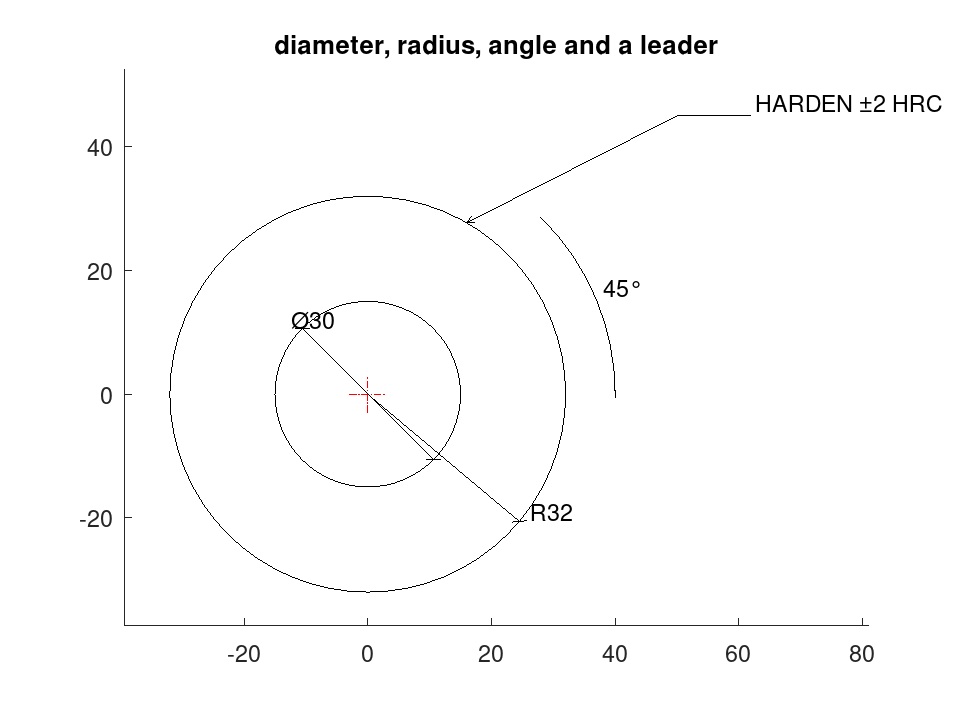
draw.Drawing
Methods
Method Reference: draw.Drawing.diam
draw.Drawing: D = diam (D, C, R)
draw.Drawing: D = diam (…, ANG, LABEL)
Append a diameter dimension across a circle.
C is the centre and R the radius. ANG sets the direction the dimension line lies along, in degrees, and defaults to 45, which keeps it clear of the centre lines. LABEL overrides the text, which is otherwise the diameter symbol and the measured figure.
A round feature is dimensioned by its diameter and never by its radius,
because a diameter is what a bore gauge and a micrometer measure. A
radius is used only where the full circle is not there to measure —
which is what radius is for.
See also: draw.Drawing.radius, draw.Drawing.angdim, draw.Drawing.centremark, draw.symbol
Source Code: draw.Drawing
The dimensioning methods label themselves from the measurement, and the drawing symbols reach every backend.
 D = draw.Drawing ('dimensioned');
 D = D.circle ([0, 0], 15).circle ([0, 0], 32);
 D.Linetype = 'CENTER';
 D.Colour = 'red';
 D = D.centremark ();
 D.Linetype = 'CONTINUOUS';
 D.Colour = 'byLayer';
 D = D.diam ([0, 0], 15, 135);
 D = D.radius ([0, 0], 32, -40);
 D = D.angdim ([0, 0], [40, 0], [30, 30], 40);
 D = D.leader ([32*cosd(60), 32*sind(60); 50, 45; 62, 45], 'HARDEN %%p2 HRC');
 plot (D);
 title ('diameter, radius, angle and a leader');